MyOwnBible offers web developers the ability to embed Bible verse autolinking and preview directly into your websites. With a plug-n-play script, website visitors will see hyperlinked scripture verse references that launch MyOwnBible.app and provide quick popover preview of the verses as well as verse sharing to social media.
Copy and paste the following script into the <head> section of your website:
<script src="https://www.myownbible.app/embed.min.js" defer></script>
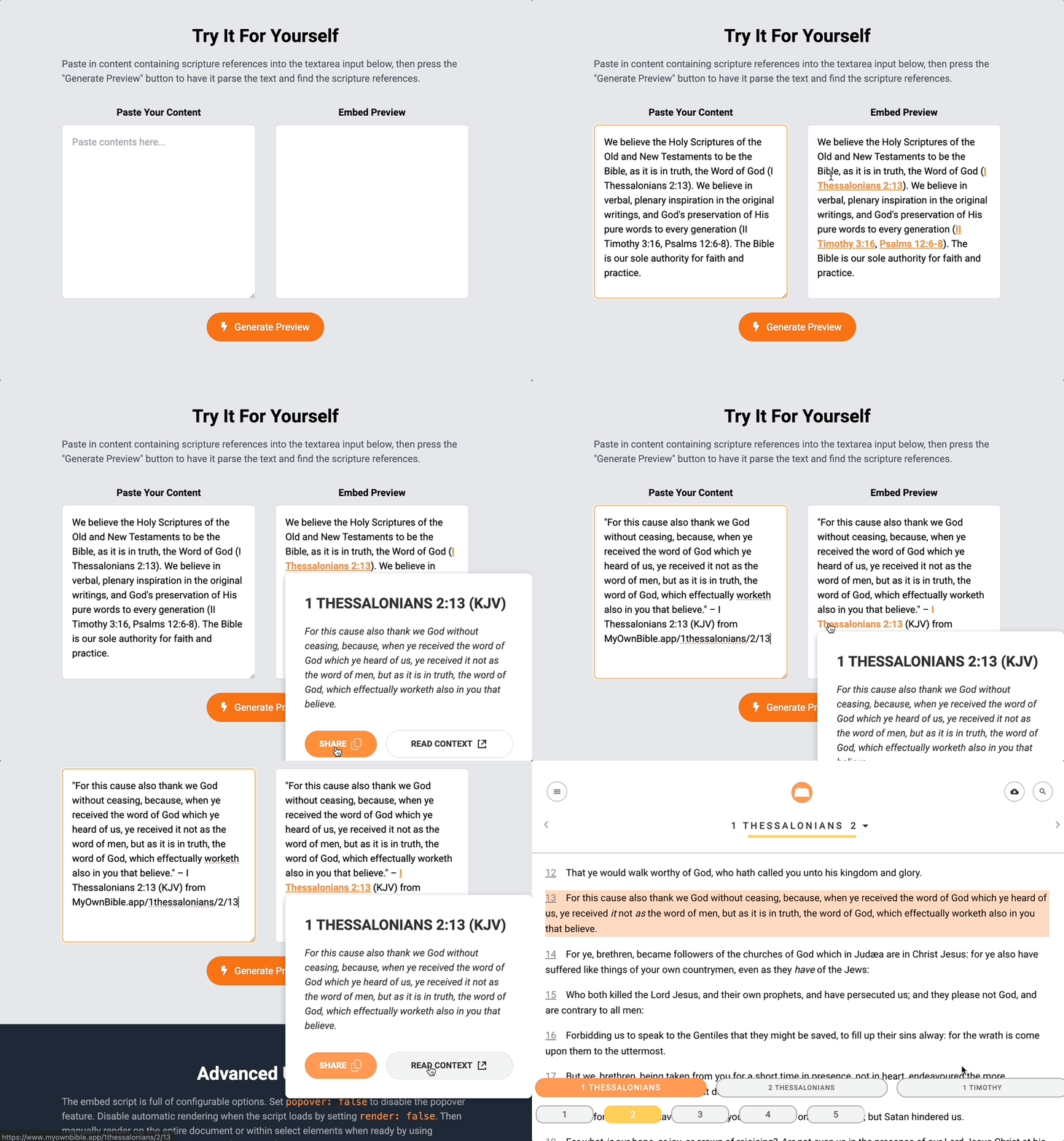
Paste in content containing scripture references into the textarea input below, then press the "Generate Preview" button to have it parse the text and find the scripture references.
Paste Your Content
Embed Preview
Configure the embed by defining window.MOBConfig before loading the script.
<script>
window.MOBConfig = {
preload: true,
render: true,
popover: true,
styles: true,
font: "Roboto",
language: "eng",
selector: "p,li,cite,q,blockquote,h1,h2,h3,h4,h5,h6",
app: "https://web.myownbible.app",
api: "https://api.myownbible.app"
};
</script>
<script src="https://www.myownbible.app/embed.min.js" defer></script>| Option | Default | Description |
|---|---|---|
preload | true | Fetch detected Scripture text in a single batch request before visitors interact with references. |
render | true | Automatically find and render Scripture references when the embed initializes. Set to false for manual rendering. |
popover | true | Display a Scripture preview when hovering over rendered references. |
styles | true | Load the default styles for links and popovers. Set to false to provide all styling yourself. |
font | "Roboto" | Font used by the default popover styles. Set to a Google Fonts family name, or a falsy value to prevent the embed from importing and assigning a font. |
language | "eng" | ISO 639-3 code for the desired Bible translation language. |
selector | "p,li,cite,q,blockquote,h1,h2,h3,h4,h5,h6" | CSS selector identifying elements whose text should be scanned when rendering Scripture references. |
app | "https://web.myownbible.app" | Base URL for links into the MyOwnBible web application. |
api | "https://api.myownbible.app" | Base URL for MyOwnBible API requests. |
The language value is sent to the API as the X-Translation header. This determines the book names, recognized abbreviations, and verse text used by the embed.
The selector option can be customized to control where references are recognized. For example:
window.MOBConfig = {
selector: "article p, article li, article blockquote"
};References inside existing links, rendered MyOwnBible references, <script> elements, and <style> elements are ignored.
The embed exposes the global MOB object for programmatic use.
MOB.init(config)Initialize or reconfigure the embed.
MOB.init({
popover: false,
language: "eng"
});Configuration passed to init() is merged with the current configuration.
If styles is enabled, the default styles are added. If render is enabled, the document is rendered automatically.
Changing configuration with init() also resets the cached Bible book catalog so it can be fetched again using the current configuration.
await MOB.parse(element)Find Scripture references in the document or a specific element without modifying its contents.
const references = await MOB.parse(document.querySelector("article"));If no element is supplied, document.body is parsed.
const references = await MOB.parse();Each result contains the recognized reference and its resolved location:
{
reference: "John 3:16",
book: "John",
chapter: 3,
verse: 16
}This can be used to inspect references, preload them, or perform custom processing.
await MOB.render(element)Find Scripture references and convert them into MyOwnBible links.
await MOB.render(document.querySelector("article"));If no element is supplied, document.body is rendered.
await MOB.render();Only text contained within elements matching the configured selector is rendered.
When preload is enabled, detected references are fetched together before interaction. When popover is enabled, hovering over a rendered reference displays its Scripture text and actions for sharing the verse or reading it in context.
This method is also useful for content added dynamically after the initial page load:
const content = document.querySelector("#dynamic-content");
content.innerHTML = newContent;
await MOB.render(content);MOB.preload(references)Fetch Scripture text for a collection of parsed references in a single request.
const references = await MOB.parse(document.querySelector("article"));
await MOB.preload(references);Duplicate references are automatically removed from the request, and references already loaded by the embed are not fetched again.
Automatic preloading can be enabled globally:
window.MOBConfig = {
preload: true
};Or disabled when you want to control preloading yourself:
window.MOBConfig = {
preload: false
};await MOB.load(book, chapter, verse)Fetch the text of an individual verse.
const text = await MOB.load("John", 3, 16);The returned value is the verse text:
console.log(text);Previously loaded verses are cached and returned without another API request.
load() is useful when building a custom interface around the embed API rather than using the built-in popover.
Set render: false when your application needs to decide when Scripture references are processed.
<script>
window.MOBConfig = {
render: false,
preload: false
};
</script>
<script src="https://www.myownbible.app/embed.min.js" defer></script>You can then parse, preload, and render specific content when needed:
const article = document.querySelector("article");
const references = await MOB.parse(article);
await MOB.preload(references);
await MOB.render(article);Or simply render the content and allow the configured preload behavior to handle fetching:
await MOB.render(article);Set language to the ISO 639-3 abbreviation for a supported translation:
window.MOBConfig = {
language: "eng"
};The language applies to the entire reference-processing pipeline. The API supplies the appropriate Bible book names and abbreviations used to recognize references, as well as the Scripture text displayed by the embed.
You can change languages programmatically:
MOB.init({
language: "spa"
});Disable Scripture preview popovers while retaining linked Scripture references:
window.MOBConfig = {
popover: false
};With popovers enabled, each rendered reference provides the verse text along with Share and Read Context actions.
The Share action copies the verse text, reference, and MyOwnBible link to the visitor's clipboard.
The embed provides default styling for its generated links and popovers.
The primary classes available for customization are:
.mob-link {
/* Scripture reference */
}
.mob-card {
/* Scripture popover */
}
.mob-btns {
/* Popover action area */
}You can override these classes in your site's CSS.
Additional elements can be targeted through the popover structure:
.mob-link > a {}
.mob-card h1 {}
.mob-card p {}
.mob-card button {}
.mob-card a {}
.mob-btns {}To disable the default stylesheet completely:
window.MOBConfig = {
styles: false
};The generated classes remain available, allowing the embed to be styled entirely by your application.
The default popover styling uses Roboto:
window.MOBConfig = {
font: "Roboto"
};When a font is configured, the embed imports it from Google Fonts and applies it to the popover content and controls.
Disable the font import and assignment when using your site's existing typography:
window.MOBConfig = {
font: false
};